
TrustRadius: an HG Insights company

MeisterTask

Score8.9 out of 10

47 Reviews and Ratings

What is MeisterTask?

MeisterTask is a task management and collaboration tool that let teams manage tasks in a customizable environment. MeisterTask's project boards adapt to a team’s workflow, and is suitable for managing a variety of tasks from software sprints to editorial calendars. As opposed to only providing a tool that visualizes the work, MeisterTask automates recurring steps in users' workflows to help them work more efficiently and consistently.

MeisterTask is developed by Meister, the company behind the online mind mapping tool MindMeister. An integration between MindMeister and MeisterTask enables users to turn their brainstorms directly into agile project boards and their ideas into actionable tasks.

MeisterTask is available as a web app and offers apps for Mac, Windows, iPhone, iPad, Apple Watch and Android devices. The mobile apps come with offline functionality so users can stay on top of their to-dos even when not connected to the internet.

Media

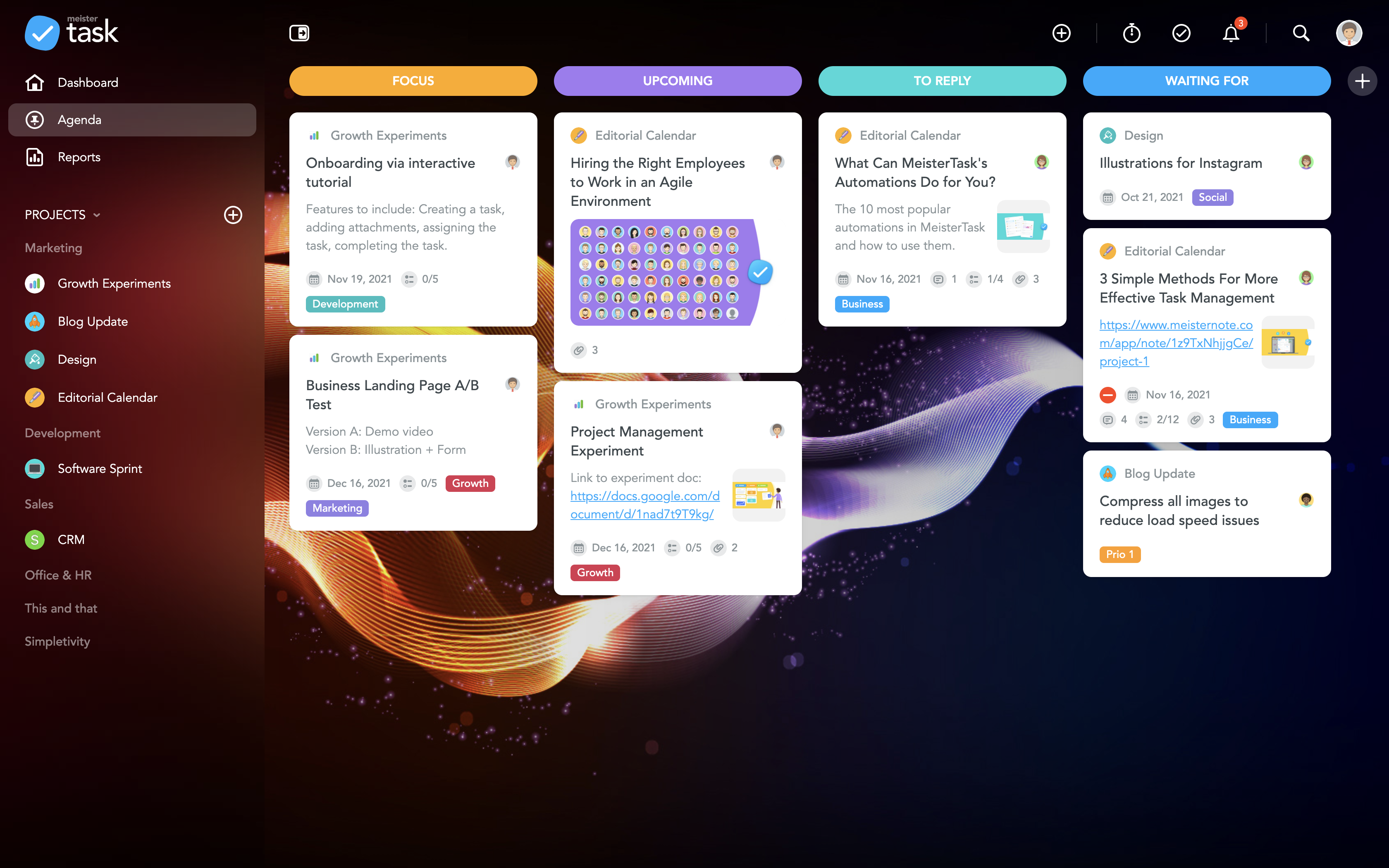
the MeisterTask Dashboard
MeisterTask's Personal Agenda
MeisterTask's Project Board
the Task board
the MeisterTask Timeline
MeisterTask Automations
MeisterTask Reports

1 / 7

Top Performing Features

  • Task Management

    This includes the ability to plan, track, collaborate and report on tasks.

    Category average: 9

  • Mobile Access

    Mobile access is the ability to access the software from a smartphone or tablet.

    Category average: 7.8

  • Support for Agile Methodology

    Agile is a time boxed, iterative approach to development that builds software incrementally instead of trying to deliver it all at once near the end.

    Category average: 8

Areas for Improvement

  • Email integration

    Email integration allows work requests to be made directly from email.

    Category average: 7.6

  • Scheduling

    Scheduling capabilities allow users to set schedules on tasks, and create timelines and milestones.

    Category average: 8.3

  • Timesheet Tracking

    Timesheet tracking is the ability to track all billable and non-billable hours for each project.

    Category average: 7.9

MeisterTask simply keeps us on track

Use Cases and Deployment Scope

We use MeisterTask to manage vendor onboarding/offloading and other projects with repetitve steps so that our team knows where the project is on the timeline and who is responsible for each portion. With the automated checklists we are sure to hit every step necessary to properly complete the project.

Pros

  • Notifies personnel when something is added to the project
  • Streamlines processes through automated checklists
  • Not overwhelming with setup steps - simplicity of managing the project

Cons

  • I would love the ability to assign steps in a task to a person rather than the whole task being assigned.
  • Would like to be able to organize my home page to pin the tasks that are important to me

Return on Investment

  • Less steps missed in the process - more effective
  • Less time taken chasing down where the project is implementation.

Usability

Alternatives Considered

ClickUp

Other Software Used

Microsoft Teams, Google Workspace

Getting on track with your to-do's and projects with MeisterTask

Use Cases and Deployment Scope

I have used MeisterTask as part of courses wherein students need to learn to work as marketeers and also undertake project management. This tool is being used to allow the students to learn to work with deadlines and multiple tasks and projects to help support agile ways of working with in school.

Pros

  • visually clearly to distinguish tasks
  • simple tracking
  • creating projects and todo's right out of MindMeister

Cons

  • with checklist item show a progress counter on the task card
  • possibility to make columns smaller, now one needs to scroll when one had more than 4 columns

Most Important Features

  • almost no learning curve
  • data storage and cloud in Europe
  • integration with ideation/ mindmapping tool MindMeister

Return on Investment

  • It allows to optimize project management & collaboration with team, hence saving time
  • smart workflow integrations such as timetracking making other tools redundant

Alternatives Considered

Trello and Asana

Other Software Used

Miro, Canva, MindMeister, MindManager, Trello, Todoist: To-Do List & Task Manager, Toggl, Semrush, Ahrefs, SimilarWeb PRO, Moz Pro

Manage my work in an orderly and simple way.

Pros

  • The learning curve is really short compared to other software that is related to this.
  • It is very easy to manage several projects at the same time, thus saving time in the work process.
  • Managing the elements of the list is very comfortable since its interface allows everything to work in an orderly manner based on what I want to put as important for me.
  • It has versions that are adapted to any type of company or if you want to give a personal use because it also has an option based on what you want to do with MeisterTask.

Cons

  • Based on the prices offered there is a large gap between these since each version has different characteristics with respect to the other, sometimes it is a bit difficult to choose.
  • After loading a file into a task it cannot be downloaded immediately, this happens since MeisterTask is not really optimized since it must process very slowly the file inside the cloud storage it has.
  • It would be nice if there was a calendar that shows in detail when a task has been scheduled and visually appealing when the task is finished.

Return on Investment

  • We have reduced administrative expenses since the projects were managed in an archaic way and we had to have personnel to only manage the projects and tasks.

Alternatives Considered

Trello

Other Software Used

Mailchimp, Insightly, Dropbox Business

Simple and friendly task management with no learning curve

Use Cases and Deployment Scope

We used Meistertask as a task management tool for incoming external jobs, tracking orders from receipt to fulfillment. We also used it to manage cross-functional teams’ work, but this was more a stepping stone to more complex systems.

Pros

  • User interface is friendly
  • Board style was flexible
  • Email replies to notifications

Cons

  • Business features were lacking
  • Slow product updates
  • Calendar and Timeline views were not very useful

Most Important Features

  • Board view
  • Comments
  • Attachments

Return on Investment

  • Simplified collaboration
  • Simplified reporting
  • Unified source of truth about work

Alternatives Considered

Trello

Other Software Used

ClickUp, Airtable, Looker Studio

Just what I was looking for

Use Cases and Deployment Scope

Used as a simple one off task tracker for small projects with usually one person assigned to it. It covers all the basics - time tracking per task, assigning with deadlines, file uploads, commenting, and custom statuses. It has a good mobile app and is very easy to pick up and get things set up and running quickly.

Pros

  • Easy to use interface
  • Good amount of customization
  • Has integration with most of the commonly used platforms

Cons

  • Hard to set up a portfolio of projects
  • Limited set of project views
  • May not dive deep enough for some users or workflows

Most Important Features

  • Simplicity
  • Easy to learn and set up
  • Microsoft integration
  • Pricing

Return on Investment

  • Dedicated platform for our one off tasks
  • Simple to set up and provide support
  • Affordable so we don’t have to buy more seats for our larger project management platform

Alternatives Considered

ClickUp, Wrike, Hive and Teamwork

Other Software Used

ClickUp, PageProof, Slack