TrustRadius: an HG Insights company

Jira Service Management

Score7.9 out of 10

716 Reviews and Ratings

What is Jira Service Management?

Jira Service Management (formerly Jira Service Desk, now including features from the former Mindville Insight, acquired by Atlassian in June 2020) is a service desk software that is purpose-built for IT, service, and support teams. The software provides everything IT and support teams need out-of-the-box for service request, incident, problem and change management. Jira Service Management integrates seamlessly with Jira Software so that IT and development teams can work better together. Users can connect service desk tickets to Jira Software issues and get to the root cause of problems before they escalate.

Media

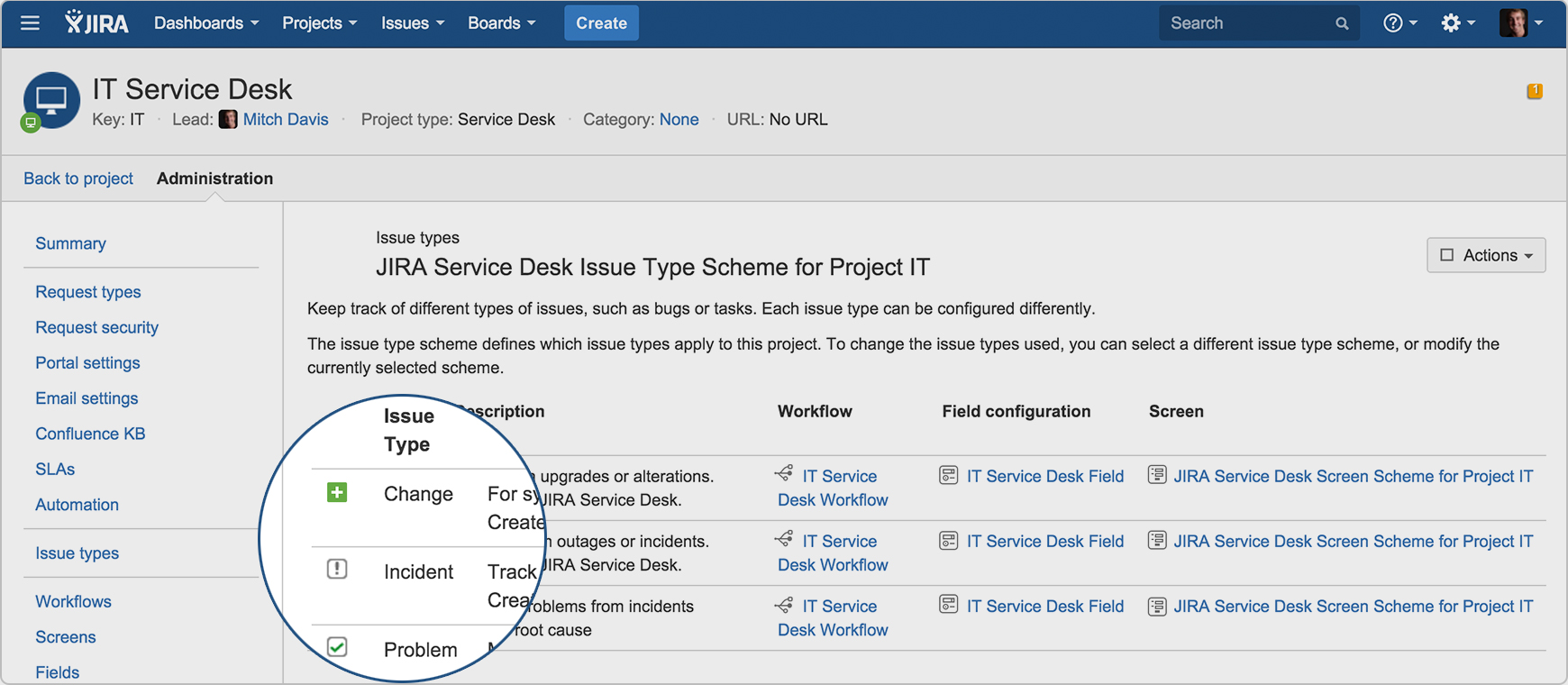
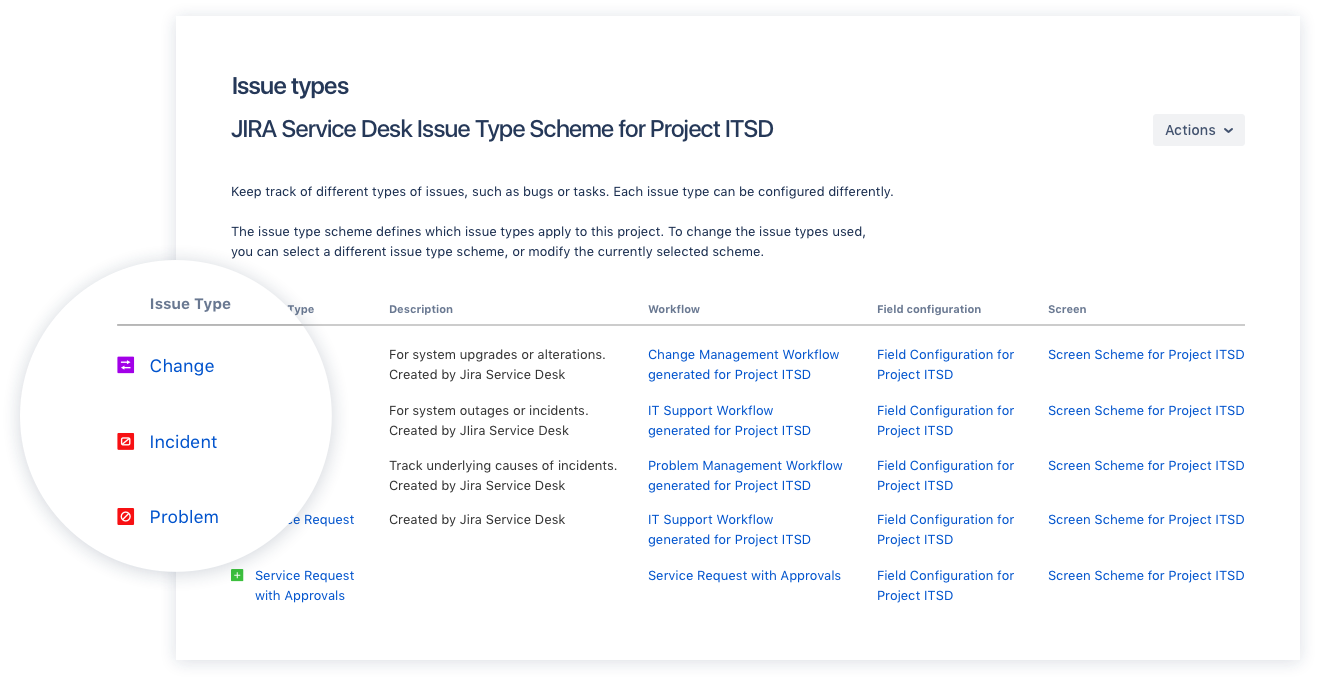
Screenshot of Drive IT best practices with ITIL-ready templates. Get everything your IT teams need out of the box for service request, incident, problem, and change management.
Screenshot of Get an ITIL certified service desk. Everything your IT teams need out-of-the-box for service request, incident, problem, and change management. Jira Service Desk is PinkVERIFY™ certified.
Screenshot of Deliver a better service experience. Customers or employees can submit requests with an easy-to-use help center and add Confluence to Jira Service Desk to get an integrated knowledge base. Machine learning intelligently recommends the right service and learns from every interaction, so answers are easy to find.
Screenshot of Stay in the loop with developers. y linking Jira Service Desk with Jira Software, IT and developer teams can collaborate on one platform to fix incidents faster and push changes with confidence.
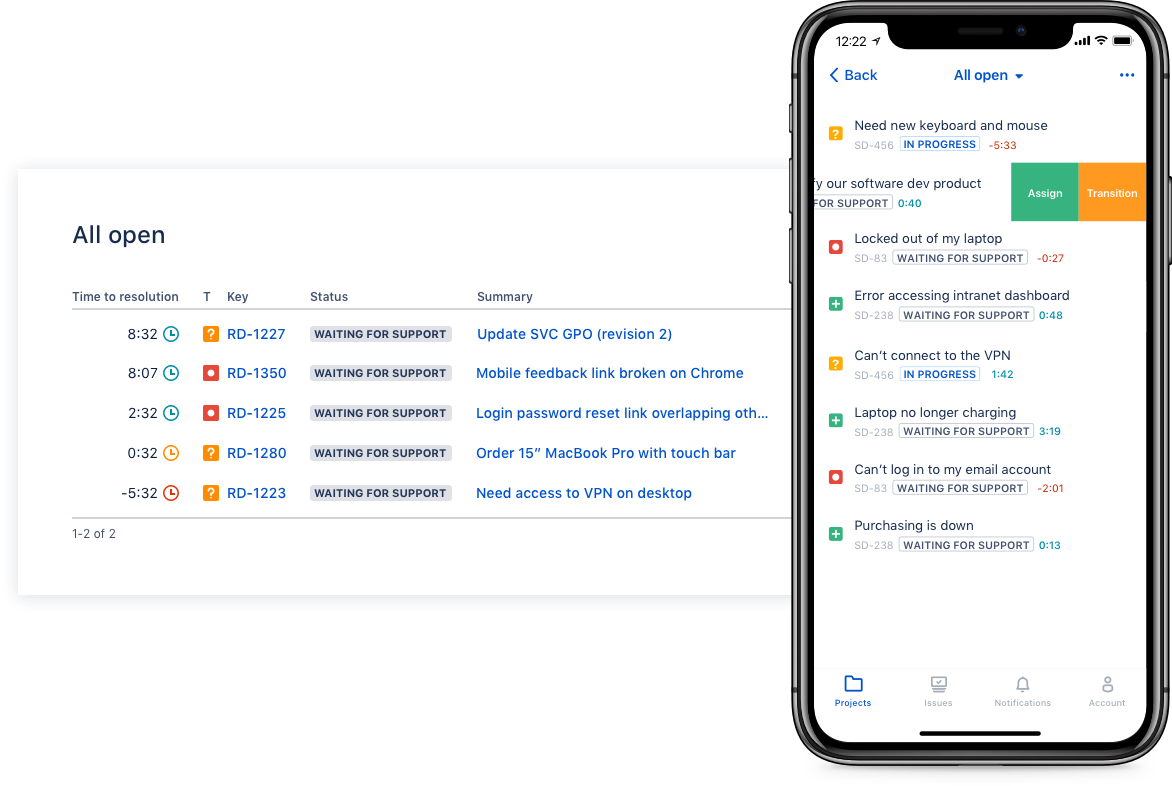
Screenshot of Deliver on SLA's. Nail your Service Level Agreements, every time. Your agents get a simple queue so they get the important things done first. Configure and get going in minutes.
Screenshot of Automate those repetitive tasks. Is your team stuck in gear with repetitive tasks or missing priority requests? Setup automations so your agents can focus on solving the important stuff and help lighten the workload.
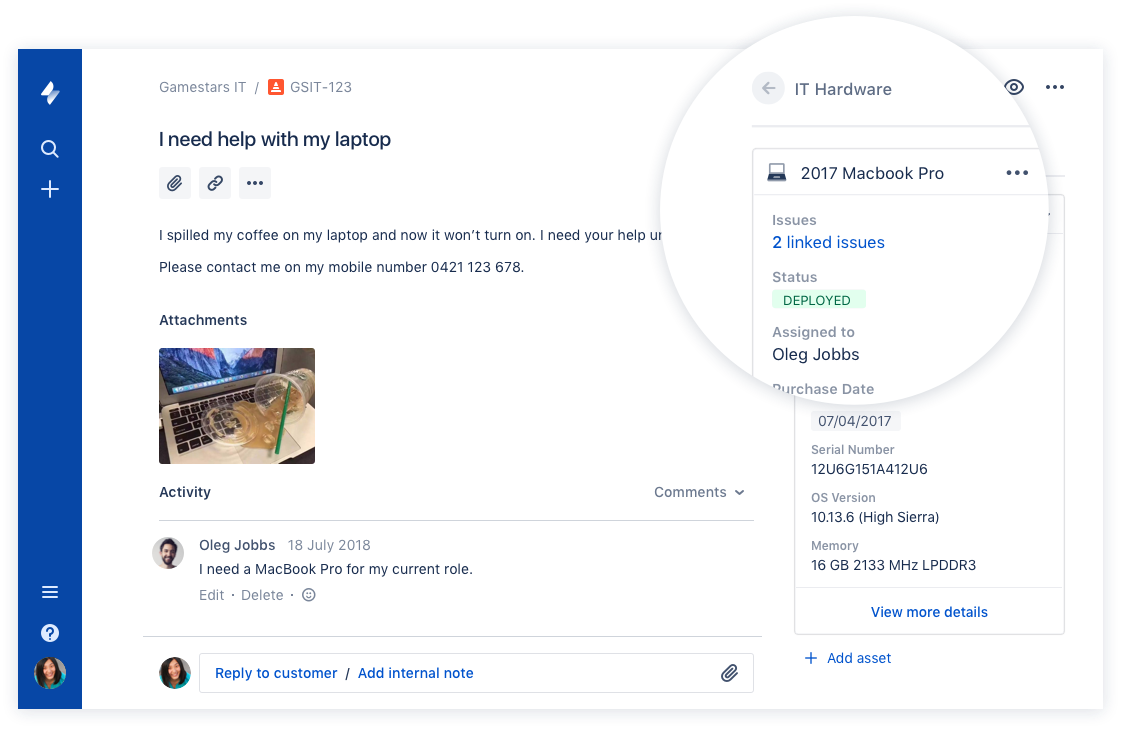
Screenshot of Gain complete control over your assets. Connect your favorite asset management tool to reference, track, and tie requests with assets directly from Jira Service Desk. Provide end-to-end service with just a few clicks.

1 / 7

Screenshot of Drive IT best practices with ITIL-ready templates. Get everything your IT teams need out of the box for service request, incident, problem, and change management.

Top Performing Features

  • Subscription-based notifications

    Users subscribe to notifications for ticket updates

    Category average: 8.4

  • Configuration mangement

    Database for tracking and reporting all business assets

    Category average: 8.4

  • Asset management dashboard

    Dashboard showing organization's software portfolio

    Category average: 8.1

Areas for Improvement

  • Service-level management

    Process for negotiating agreements regarding service level expectations, and ensuring these are met

    Category average: 8.4

  • ITSM reports and dashboards

    Reports and dashboards are used to optimize service desk operations by supplying key performance and capacity data

    Category average: 7.9

  • Change calendar

    Calendar showing change schedule to stakeholders

    Category average: 8

Top notch ticket centric ITSM...

Use Cases and Deployment Scope

We use Jira Service Management in office as the single source of truth for enterprise service desk related functions. Jira Service Management covers incident, problem and service request management. Jira Service Management is customised in terms of Technical vertical units where Managed services, Shared Services and IT Admin team have heavily customised profiles and dashboards for their presepctive individual purposes and KPI's for their specific funtional unit objectives. We have a focussed Team performing backend customizations starting from Basic setup, complex automations to bespoke functionality. We have performed in-house customizations in designing the portal, build workflows, create forms, automated workflows and rest api's.

Pros

  • Seamless devops integration - As Jira Service Management is an integrated platform it offers easy integration with jira software and when a customer reports a bug via service desk agents are able to link it back directly to the respective developers backlog items which can be pulled into sprint backlogs in return
  • Customizations - Jira Service Management has incredible customization capabilities which can be used to build aautomated workflows, custom service requests types and detailed sla's which can be tailored to specific business needs
  • Portal based end user experience - The end user portal is an easy to use interface which can be heavily customised and it serves as a self-service portal which is also a one-stop-shop for end users which is a great convinience

Cons

  • Compleixity and steep learning curve - while Jira Service Management is powerful its a bit difficult for the average tech guy to setup correctly during a short time period, backend is a bit overhelming with similar looking features which leads to confusion
  • Pricing and licensing model - Jira Service Management is quite expensive compared to its competitors in the market, especially considering that its charging model aims the number of service desk agents and the licensing for end-users is free. Further many advanced features required higher-tier plans
  • Performance clutter - The interfaces can sometimes feel cluttered and heavy, when the instance is heavily customised with complex automation and plugins the users may fell slow loads times.

Return on Investment

  • Negative - The steep learning curve of Jira Service Management puts a bit of lag on immediate to short term ROI both tangible and intangible unless the implementation is handled by advanced experts and most efficiency related automations are immediately applied.
  • Positive - Once the full automation flows(ticket based) for incident, service and problem are fully configured we would be able to immediately measure savings in terms of effort saving, time saving in terms of ROI
  • Mixed - ROI - The fastest way to obtain good results is to list down both tangible, nontangible, non financial ROI and to build project based KPI, metrics which will provide ROI in 1-3 months

Usability

Alternatives Considered

Freshservice, ManageEngine ADManager Plus and Atlassian Jira

Other Software Used

Microsoft Entra ID, Microsoft Azure, Microsoft Teams, Mozilla Firefox, FortiClient

Jira Simplifies IT Service Desk Management With Custom Workflow Capabilities

Use Cases and Deployment Scope

Jira has made ITSD management very simple and streamlined by enabling us to track, report & action custom approval flows. The platform also enhances seamless collaboration to provide real time updates and share actionable insights along with improve business process agility and improve business process outcomes.

Pros

  • Managing IT tickets for deployment and issue resolution
  • Customer approval workflows curated for cross functional departments
  • Creating custom procurement requests requiring cost center approvals

Cons

  • The platform could benefit from a more visually refined and modern UI
  • Introducing custom themes and interfaces for personalization
  • Training content to reduce time to train prospect users

Return on Investment

  • It has greatly improved compliance & risk management
  • Has enhanced decision making with Operations and IT dept
  • The overall cost has made the go to ITSM solution

Usability

Other Software Used

Microsoft 365

Jira Service Management is a no-brainer for those already in the Atlassian Ecosystem.

Use Cases and Deployment Scope

We use JSM as our internal service desk and help center for our internal team. It's been useful to help manage the provision of accounts and assets across our company. We've also used it to maintain compliance with security standards. Lastly, we use the tool for internal product questions and bugs (How do I do X).

Pros

  • Create and manage workflows for service requests.
  • Has a UX/AI that is easy to use to understand.
  • Can get started without talking to sales.

Cons

  • Requires familiarity with other Atlassian tools to use correctly.
  • Hard to use if you aren't deeply embedded in Atlassian's ecosystem.
  • The employee portal lacks customization options.

Return on Investment

  • Less ad hoc requests through email and slack that would block employees.
  • Easier to surface critical internal requests and follow up with bugs/internal issues.
  • Great for compliance needs and showing audit trails when needed.

Usability

Alternatives Considered

Zendesk Suite and Notion

Other Software Used

Notion, Atlassian Jira, Atlassian Access

JSM is the go to help desk platform.

Use Cases and Deployment Scope

We use JSM as the internal ticketing system. It's the only ticketing system we use in our organization. It's used for tasks such as requesting IT services or submitting employee requests to HR. JSM has been suitable for our needs, as it's part of the Atlassian suite, which allows us to keep documentation in Confluence and manage projects within Jira.

Pros

  • Customizability
  • Adaptability
  • Automations

Cons

  • Ease of sharing forms externally (for those not in the org).
  • The ability to customize the issue collector better.
  • Increase functions of automations.

Return on Investment

  • Customers are able to track their tickets so it's more organized.
  • Increased accountability for those fulfilling the request.
  • Ease of documenting tickets for audit purposes which is important.

Usability

Alternatives Considered

Asana, Notion and Zendesk Suite

Other Software Used

Atlassian Confluence, Asana, Gong

Excellent solution for enterprise teams

Use Cases and Deployment Scope

We were addressing the issue of managing our incoming projects and tickets in an organized way, in support of the IT and business organizations. We were looking for a tool to track project deliverables step by step as they come in, blockers, estimates and level of effort, change management and the milestones of complex projects.

Pros

  • Ticket management, including the management of incoming tickets coming from different teams within the organization
  • Workload balance, to track the level of work involved with work for each technical resource
  • Team collaboration, to allow for providing feedback and comments between cross team collaborators

Cons

  • Customer service, including the ability to have a dedicated resource at off hours to troubleshoot incoming issues
  • User community, including resources and feedback to assist with new users

Return on Investment

  • Positive impact on streamlining resources and allowing us to realize where we can optimize workload across the team
  • Positive impact on the ability to respond effectively to incoming projects and provide a level of effort in a timely manner with feedback from all team members involved
  • It's had a positive impact as the service has industry leading security standards that allows us to trust the tool to handle data that we transfer within the platform

Usability