Drupal is a free, open-source content management system written in PHP that competes primarily with Joomla and Plone. The standard release of Drupal, known as Drupal core, contains basic features such as account and menu management, RSS feeds, page layout customization, and system administration.
N/A
WebWave
Score 9.5 out of 10
N/A
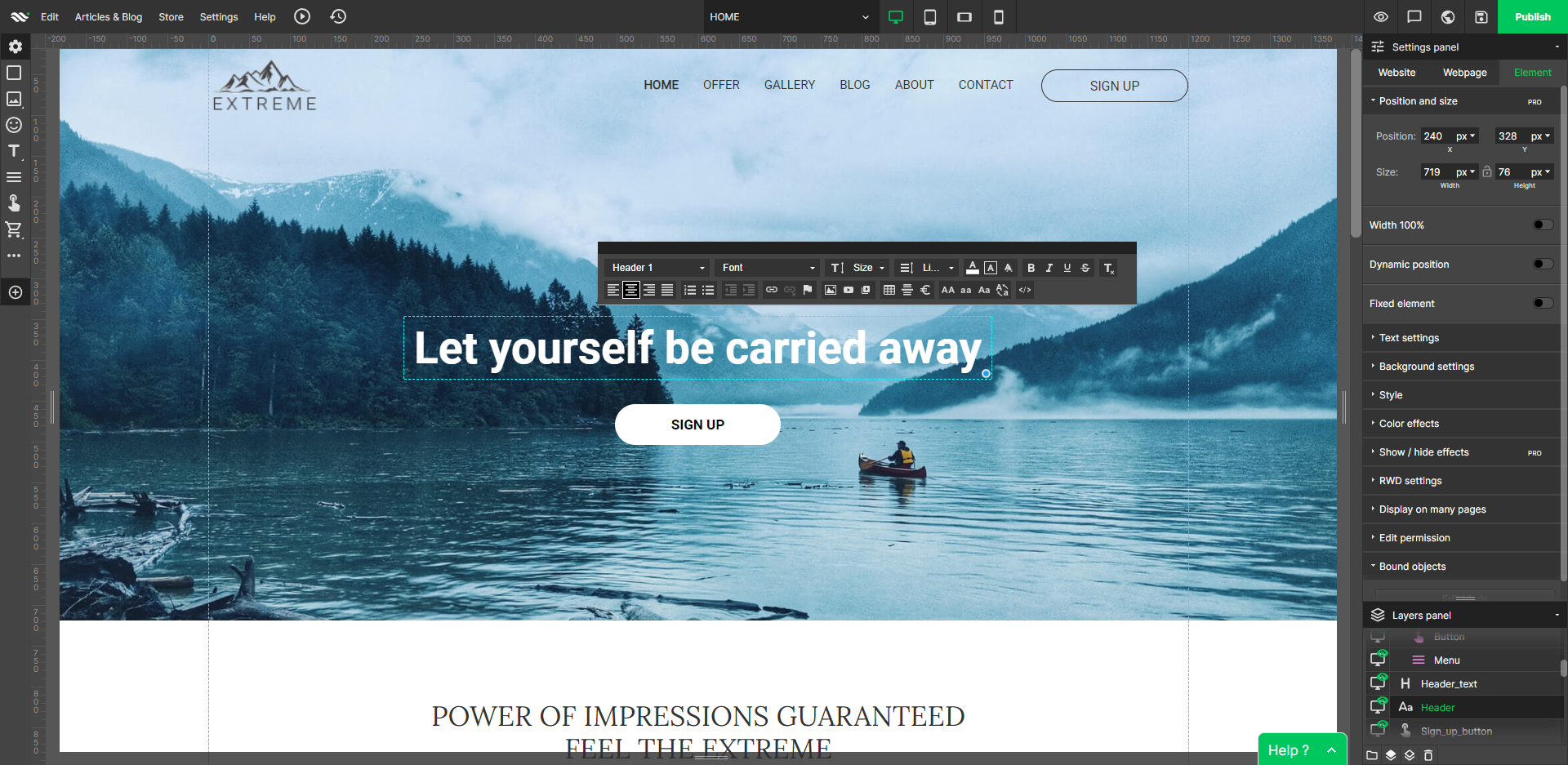
WebWave — an alternative for agencies and freelancers for creating custom websites for clients with the support of CMS. Using CMS with no sacrifices WebWave is a CMS platform that gives a designer precision up to 1 px in every single detail just like in more sophisticated graphic programs such as Photoshop while remaining a drag and drop software. This is to make creating websites much faster without loosing on details. Spend less time talking WebWave…
N/A
Wix
Score 8.3 out of 10
N/A
Wix is a website builder used to grown an online presence. The platform allows users to build their website from scratch, choose from designer-made templates, or use an AI website builder to add sections, images, and text.
I inherited Drupal from a developer who made the website for our nonprofit many years ago. It was increasingly obvious that it wasn't a fit for our organization, which has multiple staff and volunteers who need to edit or update the website but don't have coding experience. Wix …
Drupal excels at allowing seasoned programmers to really get creative with marketing initiatives in terms of working with a theme and the core code. That being said, it is definitely much more challenging for average developers and front-end builders to use, especially at …
Drupal supports lots of devices like Mac, Windows, Linux etc. easily, and it is an open source product so there's no cost required. Lots of other products require purchasing, costing a high amount. The support system of Drupal is also good in comparison to other products. The …
Drupal is certainly a more complex animal, comparatively. But its power lies in its flexibility, extensibility, and stability. And the API is fantastic. There's really nothing else like it.
WebWave is fairly easy to use. For novice users, it is easier to use than WordPress or Shopify. I think WebWave will be more SEO friendly than Wix. The price is affordable for small businesses/clients as well. The template system is much easier and takes less time than Shopi…
Most Wix and WebWave have the same features as well as their distinctions. They are pretty good on their own functionality. They have their own functionality. From the pricing perspective, WebWave is slightly ahead of Wix. The pricing of Wix is a bit more than WebWave. So, if I …
It's an easier, super complete option and cheaper Instead of paying everything separately like Wix, this option gives you all for a good price. And is the same with Elementor, you need to pay their license, the hosting, the domain, and connect everything manually, but this …
Fast load times: WebWave's websites have fast load times, which is critical for ensuring a positive user experience and better SEO performance. Responsive design: WebWave's websites are optimized for mobile devices, ensuring that they look great and function well on any screen …
WebWave is easy to use and the learning curve is also less compared to Webflow. They also have custom Html, CSS, and Javascript options which I didn't see on Dorik.com. WebWave is comparatively cheaper in comparison to Webflow. WebWave is in a good direction to becoming a good …
The advantage is that is faster if you learn how to use it and has a lot of features, if you know photoshop is a plus cause the UI is similar. I think that they call themselves the photoshop of websites.
WebWave is equal to the other services I have used in ease of use and applications. It is a good tool to have to build websites. The advantage to it is that it provides more templates that the other services don’t have that can be used for more variety in the looks of the sites …
Wix feels very similar to the experience I had with Squarespace some years ago. It far exceeds Drupal, which we found impossible to customize or integrate with things without the help of a professional developer. WordPress, of course, offers infinite customization options for …
If you want to set up a basic Not For Profit (NFP) Membership system and content base, Word Press is easier than Drupal. However, if you have specific needs that require a fair bit of customisation then Drupal is the best CRM available. If the webmaster is confident with PHP and SQL, Drupal allows a lot of creativity.
Well suited: Small businesses and entrepreneurs: WebWave is an excellent option for small businesses and entrepreneurs who need a professional-looking website without spending a lot of time and money. It's easy to use, customizable, and offers fast load times and responsive design. Less appropriate: Large e-commerce websites: If you're looking to create a large e-commerce website with a vast number of products and advanced features, WebWave may not be the best option. Its e-commerce functionality is limited compared to other website builders, and it may not be able to accommodate the needs of a large-scale online store. Also, if you need much coding, you would rather have it with something that is wordpress-based.
I would recommend Wix if you're more website-savvy; it is more customizable than Squarespace. However, Squarespace's modules look more polished than Wix's, which you drag and drop onto the site. With Wix, you need to do a lot more work, and it allows for more customizations, but I am a lot quicker on Squarespace.
WebWave's site builder is the platform's truly innovative feature. I've never come across another service that deploys a layer-based approach in web design, as most of them usually deploy a grid-based system. This is an incredible alteration that ensures WebWave behaves much like a traditional graphic design tool, thereby resulting in an experience that is a lot more intuitive and instinctive. I believe this has the potential to radically change the way people approach no-code web design.
WebWave provides automatic, daily backups and a free SSL certificate for every website. This results in excellent security.
WebWave's support team is first-class! I had some teething-issues in the beginning, but the support team quickly got me back on track.
WebWave's community/forum is an excellent place to vote and request new features. This proves the development team is committed to making WebWave better by listening to their users.
Easy to create and duplicate website, and web pages for similar products, services and campaigns, so you do not have to start from scratch
Find features such as video, image and button, and templates to customise your website's feel and look. For example, recently, I was able to add a countdown timer for the sale of tickets to our online conference.
Creating website Anchors - making it easy for you to take a visitor to a particular part of a page so that they do not need to scroll through the entire webpage making it more user-friendly.
The SEO part of Wix makes it easy for you to set up meta data, create fully functional social media shares that are on brand and looks professional in the Google search engine..
This is not an easy CMS to work with if you don't have a good understanding of website development. It isn't "plug-and-play" like Wordpress or Shopify.
Over time, doing major updates to the system can be taxing, especially if you aren't well-versed enough in doing system updates in line with your "child" theme and code.
The CMS can become somewhat cumbersome with server resources if not carefully optimized while you build and customize it to your liking.
Some scope for improvement in UX (colors are not very appealing). It is simple to use but design is a little dated. Especially in the builder section, I'd like to see modern design for buttons and maybe gradients also: as this is where visual motivation is also important
Some edits take effect only after pressing OK. That should be eliminated as it's an unnecessary addition. It's also kind of annoying to do that again and again, which can add up to a lot as we do so many small tweaks while building the website.
Few things (maybe glitches) in design. The rectangle below the footer was uneditable for me. I spent quite some time trying to figure it out so I'm convinced it's a glitch.
In my opinion, with the removal of the ADI web-building tool in favor of editor, user-friendliness has suffered tremendously.
In my opinion, the removal of the ADI web-building tool in favor of editor makes that a big portion of a website has to be redesigned, as items are now linked to each other in a different way than before.
In my opinion, the removal of the ADI web-building tool in favor of editor makes Wix only usable for professional website builders and no longer for the general public.
The time and money invested into this platform were too great to discontinue it at this point. I'm sure it will be in use for a while. We have also spent time training many employees how to use it. All of these things add up to quite an investment in the product. Lastly, it basically fulfills what we need our intranet site to do.
We will definitely renew Wix. The ability to completely control our website has been invaluable to us. We will maintain this service as long as we are an incorporated organization, we've tried several other software options and this has been the best solution by far for all of our needs.
As a team, we found Drupal to be highly customizable and flexible, allowing our development team to go to great lengths to develop desired functionalities. It can be used as a solution for all types of web projects. It comes with a robust admin interface that provides greater flexibility once the user gets acquainted with the system.
Great customization, but a pain to backtrack. They recently added the ability to set fonts etc as headings, title, body etc, but if you did not begin your build with these presets you are screwed if you ever try to change font/ colors/layout etc.
Drupal itself does not tend to have bugs that cause sporadic outages. When deployed on a well-configured LAMP stack, deployment and maintenance problems are minimal, and in general no exotic tuning or configuration is required. For highest uptime, putting a caching proxy like Varnish in front of Drupal (or a CDN that supports dynamic applications).
I never had an outage issue per say. I would say it was very reliable of a website building platform and as a marketing source there was never any issues connecting it to the server. I don’t recall there being any editing tools or hosting issues. Nothing went down when using it.
Drupal page loads can be slow, as a great many database calls may be required to generate a page. It is highly recommended to use caching systems, both built-in and external to lessen such database loads and improve performance. I haven't had any problems with behind-the-scenes integrations with external systems.
Not complex at all. It teaches you how to use their platform in a dynamic way. Each tutorial offers an explanation that can be reviewed later on. The connection speed of a web page has been smooth so far, with no major problems regarding this subject. Overall, Wix can manage 10+ pages with great connection speed.
As noted earlier, the support of the community can be rather variable, with some modules attracting more attraction and action in their issue queues, but overall, the development community for Drupal is second to none. It probably the single greatest aspect of being involved in this open-source project.
1. The support person does not seem to understand the issues, and seems like they go off to talk to somebody and revert back every 5 to 10 minutes. It takes up a lot of time. 2. There is a lack of reading material to address simple issues like changing the website name in the dashboard, pasting a code, etc.
As stated before I didn’t use the support as I did not have the feature and did not often enough need the help. I was able to figure it out mostly on my own by exploring the site. I’ve found exploring and playing on it told me how to do most things.
I was part of the team that conducted the training. Our training was fine, but we could have been better informed on Drupal before we started providing it. If we did not have answers to tough questions, we had more technical staff we could consult with. We did provide hands-on practice time for the learners, which I would always recommend. That is where the best learning occurred.
The on-line training was not as ideal as the face-to-face training. It was done remotely and only allowed for the trainers to present information to the learners and demonstrate the platform online. There was not a good way to allow for the learners to practice, ask questions and have them answered all in the same session.
Plan ahead as much you can. You really need to know how to build what you want with the modules available to you, or that you might need to code yourself, in order to make the best use of Drupal. I recommend you analyze the most technically difficult workflows and other aspects of your implementation, and try building some test versions of those first. Get feedback from stakeholders early and often, because you can easily find yourself in a situation where your implementation does 90% of what you want, but, due to something you didn't plan for, foresee, or know about, there's no feasible way to get past the last 10%
Like I said I was a beginner so it was fun to navigate and teach myself how to implement the features when building and maintaining my site. It was a fairly easy place to host my domain, and creat something simple.
Drupal can be more complex to learn, but it offers a much wider range of applications. Drupal’s front and backend can be customized from design to functionality to allow for a wide range of uses. If someone wants to create something more complex than a simple site or blog, Drupal can be an amazing asset to have at hand.
WordPress is a more flexible and adaptive content management system than Webwave. In addition to the functionalities that are already built-in, I am unable to add any customizable plugins or add-ons. However, in the majority of cases, the inherent features of Webwave are sufficient for developing a website that serves its intended purpose. Webwave also makes it possible for you to add animations and the appearance of each of your design elements, whereas WordPress builders require additional plugins in order for users to access most of such capabilities. Webwave has several essential design features available internally, thus saving money and time.
Wix is a great starting platform for anyone looking to create a website. It definitely holds its own against any other all in one website creation platform. The one thing I would say is if your main focus is solely on eCommerce you may be better off using something like Squarespace which is specifically designed for that market.
Drupal is well known to be scalable, although it requires solid knowledge of MySQL best practices, caching mechanisms, and other server-level best practices. I have never personally dealt with an especially large site, so I can speak well to the issues associated with Drupal scaling.
I give this rating to Wix because it's a great content creator. It has a great platform and also offers great customer service. If you encounter any technical issues, with Wix you will find a solution. For premium members or domain holders, this is the same as for Trial members or non-domain holders.
Wix has helped the companies I've worked with to promote their products and events. Without Wix, it would be extremely difficult to create landing pages for email campaigns or advertisements so, Wix has enabled us to save a lot of marketing and design labor.
As a marketer for a non-profit (and previously for a startup), Wix has helped the companies I've served to build marketing campaigns despite having little to no marketing budget. Because many of its features are free or affordable, small businesses and non-profits receive a huge ROI since there isn't much investment required.